What comes with my CP booth space?
- Draped 8’ back wall and draped 3’ side rails
- Furniture, carpet, electricity, internet, etc. are not included and will be to be ordered through Freeman, linked in the exhibitor portal
What comes with my MSP Summit tabletop space?
- One (1) 6’ draped table
- Two (2) chairs
- 8' back wall and 3' side rails
- Ability to bring your own pop-up banner [max size of 38"87"] and custom tablecloth
- Electricity, internet, etc. are not included and will be to be ordered through Freeman, linked in the exhibitor portal (The floor is already carpeted so flooring does not need to be purchased for your MSP Summit tabletop space)
What comes with my turnkey space?
- We have 4 types of turnkey packages (A, B, C, D) Your package type is listed within the "Sponsorship Tasks & Deadlines" portal button & the "Turnkey Booth" portal page will list your inclusions
Who do I order catering, booth cleaning, electrical, internet, etc. from?
- You'll find our approved vendor list within the "Freeman" portal button
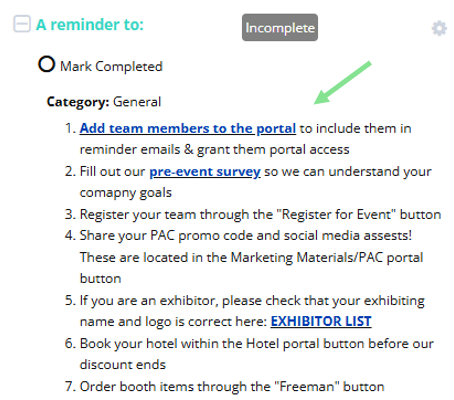
How do I add a team member to the portal and/or seed them on reminder emails?
- Log into the portal, select the "Sponsorship Tasks & Deadlines" button, and you'll see a link to add them:
Do I need to purchase Wi-Fi?
- There is complimentary Wi-Fi on-site, but it is not strong enough for streaming. If you are planning a demonstration in your booth, please consider looking into dedicated hardline internet which can be purchased in the “Freeman” portal button
What are the event hours?
- All hours can be found on the side bar of the exhibitor portal
How can I book my hotel room?
- You can book your hotel room through the "Book Your Hotel" portal button
- There is an email address on that portal page for group booking
- The deadline to book your hotel with our discount is March 11th, based on availability
How can I edit my address on the exhibitor list?
- You can edit your address through the "Company Profile" portal button
How many attendees are we expecting?
- We are estimating 7,800+ channel professionals at this event. You can find the partner attendee breakdown within the first few pages of the prospectus
How did I get a Visa Letter?
- When you register yourself with an international address, you'll see a box that says "Visa Invitation Required", if you select that, you'll find the Visa Letter attached to your registration confirmation email
Do you have CP Expo & MSP Summit logos to share?
- Yes, view our marketing logos [HERE]
What is my booth number?
- You can find your booth number on our floor plan
Where can I find the attendee list?
- The attendee list will be viewable within the "Informa Connect Tech Events" app 2 weeks prior to the event. Your registered team will be able to start networking with attendees at this time.
Do you have a press list?
- Our press list & press passes are handled by channelpartners@society32.com & you're welcome to request it from them
- Society32 is exploring media opportunities to spotlight Channel Partners conference exhibitors and would love to know if you’re interested in participating. Please advise if you plan to demo or share a new product or service at the show. If you have any announcements to make, we invite you to use the press release template located here. Any questions on the press opportunities, you may contact our PR team at channelpartners@society32.com
What is the warehouse address?
- Our warehouse is located on Sunset Rd. Clearly write your booth or tabletop number on the below pre-made shipping labels:
- Warehouse shipping labels (CP Expo // MSP Summit)
Shipping notes:
- If required, provide your carrier with this phone number: (888) 508-5054
- Warehouse accepting dates: March 13 - April 7 (M-F 7:00 AM - 2:30 PM)
Ready to register your team?
- Review this registration document first to understand pass types and ensure accurate registration
- You do not have access to change a pass type after registering
Make sure your logo and exhibiting name is correct on the exhibitor list. If you need your logo changed, please email it in .eps format to CPCustomerSuccess@informa.com .eps format is needed to ensure it is not blurry
Was this article helpful?
That’s Great!
Thank you for your feedback
Sorry! We couldn't be helpful
Thank you for your feedback
Feedback sent
We appreciate your effort and will try to fix the article